


MAJORITY: Mobile banking
4.712.02K Reviews
App Specs
- Version
- 5.14.0
- Updated On
- License
- Free
- Downloads
- 1,000,000+
- Developer
- MAJORITY USA, LLC
- Categories
- Finance
- Platform
- Android, iOS
Screenshots

 Analysis by AppCompare
I approached MAJORITY: Mobile banking as a practical money app rather than a replacement for every financial service. My overall impression is clear: it is most useful for people who want a straightforward US account and debit card, especially when sending money to family abroad and managing everyday spending from one place. It is free to install, aimed at Everyone, and developed by MAJORITY USA, LLC. That combination makes it easy to try, but the real question is whether its focused approach matches the way you handle money.
The app sits in the finance category and has built a substantial audience, with more than a million installs and a 4.7 average from roughly 23 thousand ratings. Those figures suggest that the basic experience works well for many users, but they should not be mistaken for a promise that it will suit every banking situation. I found its appeal strongest when convenience, access, and international family support matter more than having the broadest possible collection of financial tools.
What MAJORITY does well in everyday banking
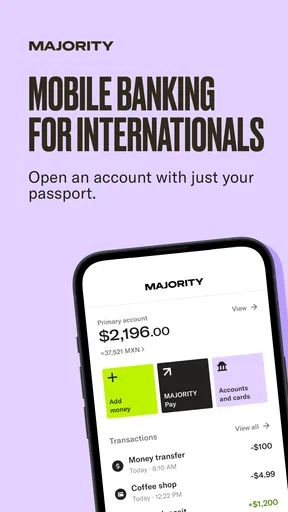
The first thing I noticed is that the service is built around a simple starting point: an account and debit card for use in the United States without requiring a Social Security number. That is a meaningful distinction for people who may have difficulty entering the traditional banking system. Instead of presenting itself as a complicated financial dashboard, the app keeps the central experience focused on receiving, holding, and using money.
That focus makes the onboarding idea easy to understand. You are not opening the app primarily to research investments, compare mortgage products, or manage a large portfolio. You are opening it to handle ordinary financial tasks. For a user who needs a debit card for purchases, wants a place to organize incoming money, or needs to send funds home, that narrower purpose can feel more approachable than a conventional bank app filled with unrelated menus.
I also think the international angle is more than a decorative extra. Sending money home is often a recurring responsibility, not an occasional experiment. A useful workflow is to treat the app as the central point for your regular US spending and your family-support routine: check the available balance, leave enough for upcoming card purchases, and make the transfer only after confirming that the remaining amount covers your immediate needs. That habit reduces the chance of sending too much and then discovering that your own debit card spending is restricted.
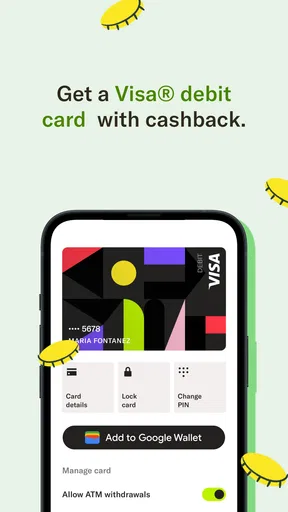
Another practical strength is the relationship between the account and the debit card. When the two are managed through the same mobile experience, everyday decisions become easier to follow. I can imagine using it for groceries, transport, phone expenses, and small recurring payments while keeping a separate mental category for money intended for relatives. This is not sophisticated budgeting, but it is a useful behavioral structure for someone who wants fewer moving parts.
The app also presents itself as a way to build credit. I would treat that as a long-term feature of the service rather than an instant solution. Credit progress depends on using the account responsibly and understanding the conditions attached to any credit-building process. The sensible approach is to read the in-app explanations carefully, use only money you can manage, and avoid assuming that simply downloading a finance app will improve your credit history.
Worth Reading Before You Choose

EA SPORTS FC Mobile 26 Is a Bigger Football Game, but It Takes Time

Flipboard Shows What News Apps Must Do Beyond the Feed

Switching to Android Auto Means Rethinking Your Driving Routine

Google Calendar Makes a Crowded Week Easier to Manage

Ludo King Makes the Most of the Minutes Between Plans

Baby Panda World Brings Quick Play to Modern Phones, but Its Game Library Feels Busy
That distinction matters because many people confuse access to a debit card with access to credit. A debit card spends money already available, while credit-building tools are intended to help establish a record of responsible financial behavior. MAJORITY combines these ideas in one product, but I would still keep my expectations realistic and monitor my own progress instead of treating the credit message as a guarantee.
A realistic use case for newcomers and families
Consider someone who has recently arrived in the United States and needs a practical way to pay for daily necessities. They may not have a Social Security number, may be supporting relatives in another country, and may prefer handling money from a phone rather than visiting a branch. In that situation, the app’s account, debit card, money-transfer focus, and communication tools form a coherent package.
The useful workflow is not merely “send money whenever necessary.” I would first use the account for predictable local expenses, then decide on a fixed amount for family support after checking upcoming bills. If a transfer is part of a monthly routine, recording the date and amount outside the app can make the household budget easier to review. The app can simplify the transaction, but it cannot replace the discipline of planning around irregular income or emergencies.
Staying in touch is another part of the product’s intended experience. For families separated by borders, financial support and communication often belong together. I see value in having those needs represented in one service, although users should still judge whether the communication tools are genuinely convenient for their family or whether their existing messaging habits are better.
Where the focused design becomes a limitation
The same simplicity that helps a newcomer can feel restrictive to an experienced banking customer. If you want a broad set of account types, elaborate spending analytics, extensive savings tools, or the deep integrations commonly found in a full-service bank, this may not be the right primary account. Its strength is concentration, not breadth.
I would also be cautious about making it the only place for all of my money immediately. A newer or specialized financial service deserves a gradual approach: start with ordinary spending, learn how transfers and card management work, and keep a backup method available while you become comfortable. That is not a criticism unique to this app; it is sensible behavior whenever a mobile service becomes part of an important financial routine.
Users should pay attention to verification and transfer details during setup. The “no SSN” positioning may be attractive, but it should not be interpreted as “no identity checks” or “no requirements.” Financial services still need to establish who is using an account and may ask for information during registration or when certain activities are performed. I would read each prompt rather than rushing through it, especially if the account will receive regular income or support larger transfers.
There is also a trade-off in relying on a phone-centered experience. A mobile app is convenient when your device, number, and connection are available. It is less comfortable when your phone is lost, your number changes, or you need help with an unusual account problem. Before making the service central to your finances, I would make sure I understand the available support path and keep essential account details stored securely, without saving sensitive information in an exposed notes app or screenshot folder.
How it compares with ordinary alternatives
Compared with a traditional bank, MAJORITY’s appeal is accessibility and a more targeted experience. A conventional bank may offer a wider range of products, established branch access, and more extensive financial infrastructure, but its account-opening process may be less welcoming to someone without a Social Security number. For a user whose priority is getting a usable US account and debit card, the specialized route can be more practical.
Compared with a general money-transfer app, MAJORITY appears more complete for someone who wants both local spending and sending money home. A transfer-only service may be preferable if you already have a bank account and only send occasional payments, particularly when you want to compare transfer options independently. MAJORITY makes more sense when the account itself is part of the problem you are trying to solve.
Compared with a prepaid card, the important question is purpose. A prepaid product can be useful for controlled spending, but it may not provide the same combination of account access, international support, and credit-building orientation. On the other hand, a prepaid card may be a better fit for a teenager, a tightly limited spending allowance, or someone who does not want to connect everyday banking and family transfers in one service.
For credit building specifically, I would compare the app with dedicated credit-building products before committing. A specialist may offer clearer education or a more concentrated credit-monitoring experience, while MAJORITY is more attractive if credit support is only one part of a broader need. The best choice depends on whether your main problem is establishing credit or managing US money and international family obligations together.
Small habits that make the experience safer and clearer
I would begin with a modest balance and a short list of routine purchases. That gives you time to understand how the debit card fits your spending without turning the first week into a complicated financial migration. Once the basics feel predictable, you can decide whether receiving more money or using the transfer function regularly makes sense.
I would also separate “available for me” from “intended for home” in my own budget. The app may show the account balance, but the meaning of that balance depends on your plans. A simple written split can prevent accidental overspending, especially when a transfer is scheduled around rent, utilities, or a paycheck that arrives later than expected.
For credit-related tools, I would read the terms every time the app presents a new step or explanation. Look for what activity is expected, what money is involved, and how progress is measured. The most important non-obvious lesson is that a credit-building feature should be treated like a commitment, not a button to press once. If you cannot maintain the required routine comfortably, waiting may be wiser than forcing it.
Finally, I would keep notifications enabled for meaningful account activity while avoiding casual sharing of account screenshots. Notifications can help catch an unfamiliar card transaction quickly, but screenshots can expose balances, names, or account details. That combination of active monitoring and careful privacy habits is more valuable than simply checking the app once in a while.
Who should choose it, and who should look elsewhere?
I would recommend MAJORITY to a newcomer who needs a practical US financial starting point without a Social Security number, wants a debit card for everyday purchases, and regularly sends money to relatives. It is also worth considering for someone who values a focused mobile experience and wants credit-building support included alongside ordinary account use.
It may suit families who want a repeatable routine rather than a collection of disconnected services. One person can use the account for local expenses, plan a family transfer, and stay connected through the same broader service. The benefit is organizational simplicity, not necessarily the lowest cost or the most advanced tool in every individual category.
I would steer a different user toward a traditional bank if they need branches, a wide selection of financial products, or a more established all-purpose banking relationship. I would choose a transfer-focused alternative if I already had a satisfactory bank account and only needed occasional international payments. And I would look at a dedicated credit product if improving my credit record were the only reason I was considering this app.
The current release is version 5.14.0 and supports devices running iOS 9 or later. That makes device compatibility worth checking before registration, particularly if you use an older iPhone or maintain a phone that no longer receives regular system updates. A finance app is handling sensitive activity, so I would prefer using it on a device with a current lock screen, updated operating system, and secure personal access.
My final assessment
MAJORITY works best when I judge it on its intended job instead of expecting it to become a universal bank. Its strongest case is the combination of a US account, debit-card access, support for sending money home, communication, and a path toward building credit. For the right user, those pieces address a real everyday problem with less friction than starting with several unrelated services.
Its limitations are equally important. A focused app may not satisfy people who want a complete financial ecosystem, branch-based assistance, or advanced planning tools. The no-SSN message should encourage eligible users to investigate the service, not encourage anyone to skip the normal responsibility of reading requirements and terms. I would also adopt it gradually, keep a backup option, and separate spending money from transfer money in my personal budget.
With those expectations, I see it as a useful specialized finance app rather than a one-size-fits-all banking answer. It is free, accessible to an Everyone audience, and already used by a large community, with about 12 thousand written reviews alongside its broader rating base. My recommendation is strongest for newcomers and internationally connected households that need practical access first and financial complexity second. If that describes you, MAJORITY is worth exploring; if you already have a full-service bank and only need one occasional transfer, its wider package may be more than you need.
Pros
- Simple interface makes everyday banking easy to navigate.
- Supports quick transfers and convenient bill payments.
- Real-time balance updates help track spending closely.
- Useful alerts can notify you about account activity.
- Mobile access reduces the need to visit a branch.
Cons
- Some features may vary depending on your country and bank.
- Customer support response times may be inconsistent.
- Advanced budgeting and financial tools are relatively limited.
- App performance can depend on your internet connection.
- Not all account types may be supported by the service.
FAQs for MAJORITY: Mobile banking
What is MAJORITY, and who is the mobile banking service designed for?
MAJORITY is a mobile banking service built primarily for immigrants, international workers, and people who regularly send money across borders. After installing the app, users can typically manage a spending account, receive a debit card, make transfers, and access international calling or remittance-related features, depending on their location and plan. Availability, eligibility, and included services may vary by country.
How do I sign up for a MAJORITY account, and what identification is required?
To open an account, you generally download MAJORITY, enter your personal information, verify your phone number, and complete an identity-checking process. The app may request a government-issued identification document, a selfie, address details, or other information required by financial regulations. Approval is not always instant, and MAJORITY may limit access if submitted details cannot be verified successfully.
Can I use MAJORITY to receive my salary, pay bills, and make everyday purchases?
MAJORITY can be used for many routine banking tasks, such as receiving eligible direct deposits, paying bills, transferring money, and making purchases with its associated debit card. The exact capabilities depend on your account status, country, merchant, and transaction type. Before relying on it as your only bank, review deposit limits, supported billers, card acceptance, and any applicable transaction fees.
Does MAJORITY support international money transfers and sending money to family abroad?
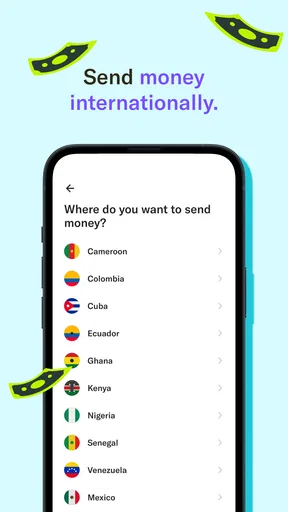
International transfers are one of the service’s main attractions, particularly for customers supporting relatives in another country. In the app, you can review available destinations, enter recipient details, and see the exchange rate and fees before confirming a transfer. Delivery times, supported countries, transfer limits, and recipient options can change, so always check the final quote and conditions before sending funds.
Are there fees for using MAJORITY, and is my money protected?
MAJORITY may charge a recurring membership fee or additional fees for selected services, such as certain transfers, cash withdrawals, expedited transactions, or card-related operations. The app normally displays relevant pricing before confirmation, but users should read the current fee schedule carefully. As a financial service, account protections and insurance arrangements depend on the banking partners, product, and jurisdiction, so verify the applicable terms.


